
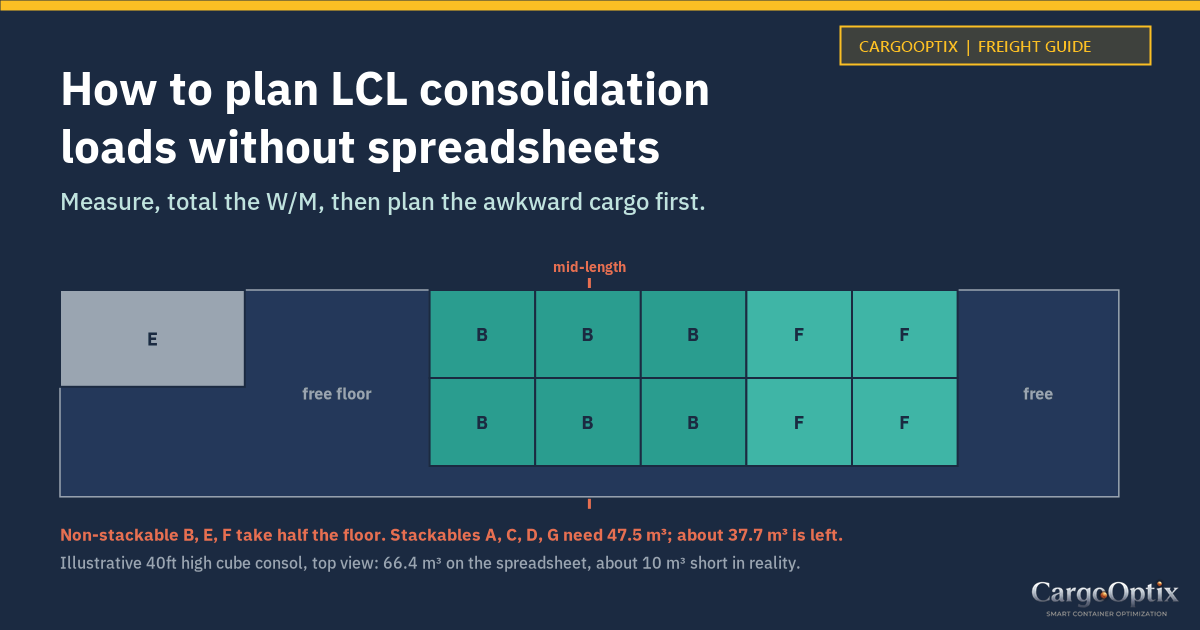
How to Plan LCL Consolidation Loads Without Spreadsheets
To plan an LCL consolidation, measure every booking as it lands at the CFS, add up the revenue tons, then build a 3D plan that respects stacking limits, weight distribution and loading order before the crew starts stuffing. A spreadsheet is good at the first two. It can't tell you whether the cargo physically fits, and that's usually where consols go wrong.
This is a practical method for forwarders and NVOCCs running groupage boxes out of Jebel Ali, Sharjah or any origin CFS, with a worked example you can check yourself.
Where spreadsheet LCL planning breaks
Most consol sheets look the same: one row per booking, pieces, dimensions, weight, a CBM column and a running total compared against 28, 58 or 68 CBM. When the total is under the number, the box is "fine".
That breaks in a few predictable ways:
- CBM totals ignore shape. A non-stackable pallet 1.6 m tall in a high cube leaves about 1.1 m of empty space above it. The sheet still counts that space as available.
- Stacking rules live in someone's head. "Don't put anything on the drums" or "the tiles can take light cartons" is rarely in the file.
- The crew can't load from a spreadsheet. They need to know what goes in first and where, not a list of totals.
- Versions multiply. A late booking comes in, someone edits a copy, and by cut-off nobody's sure which file is current.
Keep the spreadsheet. Packing lists will keep arriving in Excel. Just stop using it as the plan.
Step 1: Get clean cargo data at receiving
Declared dimensions are often rounded or simply wrong, which is why CFS operators re-measure. For every package type, capture:
- Booking or house B/L reference
- Package type and quantity
- Length, width, height in one unit (mm or cm, not a mix)
- Gross weight per package
- Whether it can take weight on top, and how much
- Orientation limits ("this way up")
- Fragile or special handling, and any dangerous goods class
Use measured figures, not booking figures, and flag any difference to the shipper and to billing, since it changes the revenue tons.
Step 2: Add up W/M, then check it against the box
LCL is normally charged per revenue ton, or W/M: whichever is greater of the volume in CBM or the weight in metric tons. One CBM or 1,000 kg is one revenue ton. You can work out each booking's CBM with our free CBM calculator.
Here's an example consol for a 40ft high cube (Maersk spec: 12,032 x 2,350 x 2,697 mm inside, about 76 m³, 28,620 kg payload). The bookings are invented for illustration.
| Booking | Cargo | Qty | Size (cm) | kg each | CBM | Total kg | Can take load on top? |
|---|---|---|---|---|---|---|---|
| A | Cartons, household goods | 120 | 60 x 40 x 40 | 18 | 11.52 | 2,160 | Yes |
| B | Pallets, auto parts | 6 | 120 x 100 x 160 | 850 | 11.52 | 5,100 | No |
| C | Cartons, garments | 210 | 60 x 50 x 40 | 9 | 25.20 | 1,890 | Yes |
| D | Drums, lubricant | 16 | 60 x 60 x 90 | 210 | 5.18 | 3,360 | Yes, with boards |
| E | Crate, machine part | 1 | 210 x 110 x 130 | 1,450 | 3.00 | 1,450 | No |
| F | Pallets, tiles | 4 | 120 x 100 x 90 | 1,100 | 4.32 | 4,400 | No |
| G | Cartons, electronics, this way up | 80 | 50 x 40 x 35 | 12 | 5.60 | 960 | Yes |
| Total | 66.35 | 19,320 |
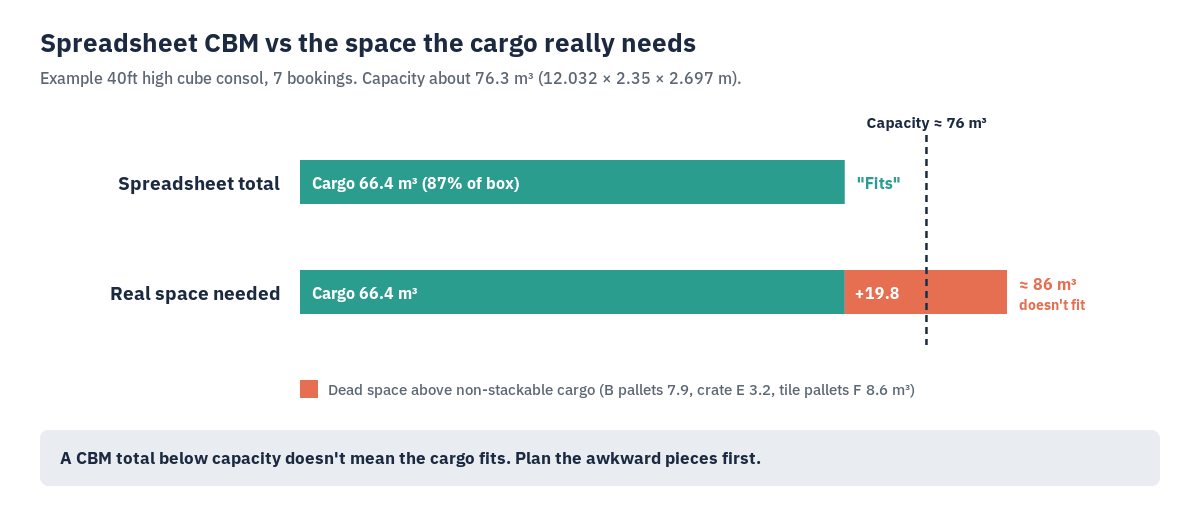
The spreadsheet says 66.35 CBM in a 76 m³ box, about 87% full, and 19.3 tonnes against a 28.6-tonne payload. Looks easy. It isn't.
Step 3: Plan around the awkward cargo first
Start with the cargo that can't have anything on top. Each piece claims a floor position and the full height above it.
- Booking B: 6 pallets, 1.2 x 1.0 m footprint, 1.6 m tall. The space above each is about 1.1 m, so roughly 7.9 m³ is lost.
- Booking E: the crate leaves about 1.4 m above it, roughly 3.2 m³ lost.
- Booking F: the tile pallets are only 0.9 m tall, so about 8.6 m³ goes empty above them.
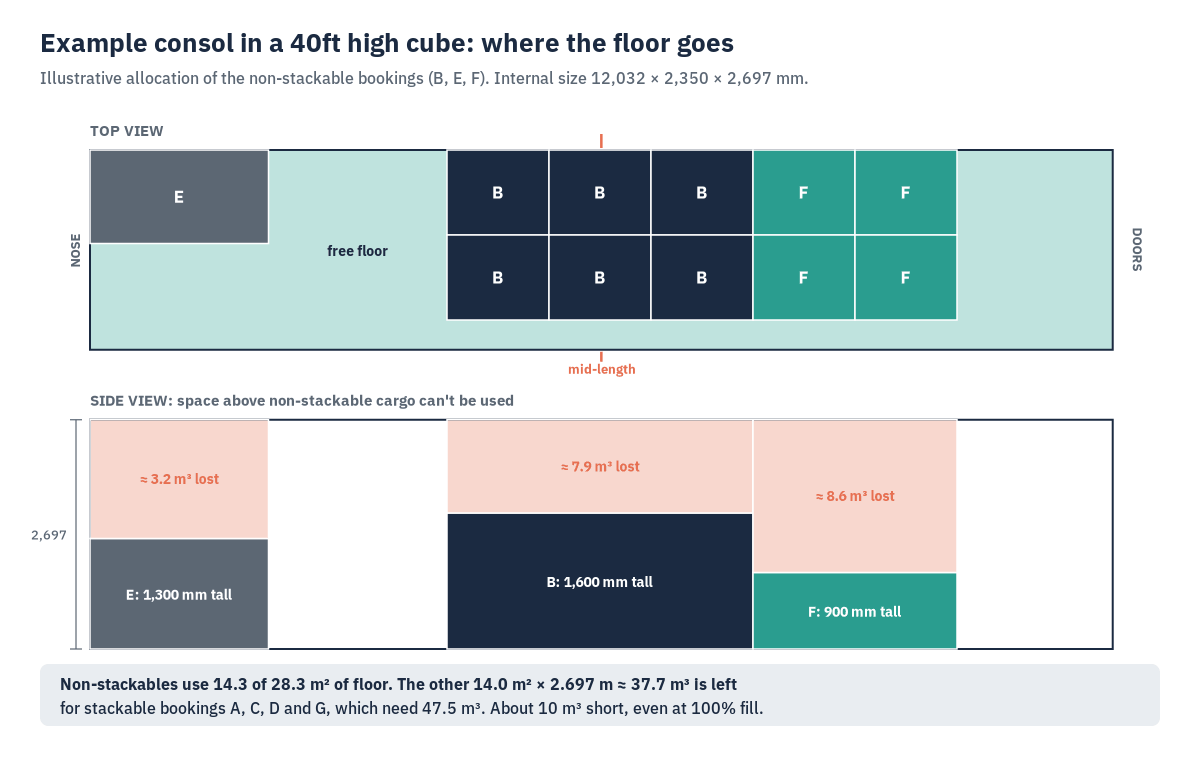
That's close to 20 m³ of space the CBM total quietly counted as usable. Put another way, the non-stackable cargo uses about 14.3 m² of the 28.3 m² floor. The remaining 14 m² of floor at full height gives about 37.7 m³ for the stackable bookings, which need 47.5 m³. Even at a perfect 100% fill, it's about 10 m³ short.
Now you have options, and you have them before the crew starts rather than on the dock:
- Check whether the tile pallets can safely take the light garment cartons on top. If the packaging allows it, that wins back most of the 8.6 m³.
- Roll part of booking C or all of booking G to the next sailing, and tell the shippers now.
- Re-palletise B to a lower height if the shipper agrees.
A spreadsheet can't show you this. A 3D plan shows it at a glance. The same logic applies to cartons: how your carton sizes divide into the box matters more than the CBM total, as we cover in how many cartons fit in a 20ft or 40ft container.
Step 4: Check weight distribution
The heavy items in this consol (B, D, E and F) add up to 14.3 of the 19.3 tonnes. If they all end up at the nose because they were received first, the box will be nose-heavy.
The CTU Code, the IMO/ILO/UNECE packing code, says the cargo's centre of gravity should be close to the container's mid-length and mid-width, with longitudinal eccentricity not exceeding 5% in general. Its rule of thumb is that 60% of the cargo mass should sit within 50% of the container's length. It also says to keep the centre of gravity below half the height of the cargo space, which in practice means heavy cargo low and light cargo on top.
For a consol, that usually means splitting the heavy pallets so some sit forward of the middle and some behind, with the light cartons filling around and above them.
Step 5: Set the stuffing sequence
A plan is only useful if the crew can follow it. Number the steps in the order things go in, starting at the front wall (the nose) and working back to the doors.
A few practical rules:
- Heavy, non-stackable floor cargo goes in first in its planned position.
- Light cartons fill around and above.
- If the box will be partly stripped at a hub before final destination, the cargo that comes out first goes nearest the door.
- Leave a known, measured space for any late booking you've accepted, rather than "whatever's left".
- Block or brace gaps so nothing can shift. Annex 7 of the CTU Code covers securing methods in detail.
Hand the crew a printed sequence, not a verbal briefing. It's also your record if a damage claim comes later.
Step 6: Work out the gross mass for VGM
Under SOLAS chapter VI regulation 2, a packed container needs a verified gross mass before it's loaded on the ship. The IMO guidelines (MSC.1/Circ.1475) allow two methods. Method 1 weighs the packed container. Method 2 adds up the mass of all packages and cargo, pallets, dunnage and securing material, then adds the container's tare, using a method certified by the competent authority where the container was packed.
For a consol, the guidelines put the responsibility on the shipper named on the ocean carrier's bill of lading, even when the box holds cargo from many parties. That's normally you, the consolidator. So the sum needs to be right, and each piece of packing material counts.
In the example that's 19,320 kg of cargo, plus pallets, dunnage and securing material, plus the 3,880 kg tare of that Maersk high cube. A planning figure is a working number. The declared VGM comes from your certified Method 1 or Method 2 process.
What this looks like in CargoOptix
CargoOptix is a browser-based 3D container load planner, built for this kind of job. You keep your packing lists in Excel or CSV. You bring the spreadsheet in, and CargoOptix packs the cargo in 3D and gives you:
- A 3D view of where everything sits
- A door-to-nose loading sequence for the crew
- CBM totals
- Gross-mass working, with the arithmetic shown, to help you prepare SOLAS VGM figures (it's a planning aid, not a VGM certificate)
- A PDF to hand to the CFS team and a CSV for your records
It also plans trucks and pallets. The packing engine runs fully in your browser, so your customers' manifests and cargo data never leave your device. There's no API or TMS integration, so it works from files in and files out. The features page has the full list.
If you plan a few consols a week, the 15-run pack ($29.99) or a 24-hour pass ($9.99) may be enough. If you plan every day, there are monthly plans and a 5-seat Team plan on the pricing page. Every account starts with a free 7-day trial and keeps one free plan a day after that.
Run your next consol through a free 7-day trial
Palletised consols out of the UAE have their own trap, covered in UAE pallet sizes and the 20 mm problem. More guides are on the blog.
FAQ
What is LCL consolidation planning? Deciding how several shippers' cargo goes into one container: what fits, where it sits, what stacks, how weight is spread and the loading order.
How is LCL freight charged? Usually per revenue ton (W/M): the greater of the volume in CBM or the weight in metric tons, where 1 CBM or 1,000 kg counts as one revenue ton. Minimum charges, often 1 W/M, are common.
Can I plan an LCL consolidation in Excel? You can total CBM, weight and W/M. You can't check geometry: non-stackable cargo, lost height, door clearance and weight balance.
Who is responsible for the VGM of a consolidated container? Under MSC.1/Circ.1475, the shipper named on the ocean carrier's bill of lading, normally the consolidator or NVOCC.
How should weight be distributed in a container? Centre of gravity close to mid-length and mid-width, with longitudinal eccentricity not over 5% in general. The CTU Code's rule of thumb is 60% of the cargo mass within 50% of the length.
Sources
- IMO, MSC.1/Circ.1475, guidelines on verified gross mass (definitions of gross mass, shipper and tare; Methods 1 and 2; containers packed by multiple parties)
- IMO/ILO/UNECE, Code of Practice for Packing of Cargo Transport Units (CTU Code), Annex 7 (centre of gravity, 60/50 rule of thumb)
- Maersk, Dry equipment specifications (40ft high cube dimensions, tare, payload)
- Example consol figures: illustrative bookings, worked out by hand from the table above
Try the 3D planner free for 7 days
Figures are planning aids, not a verified VGM declaration. See the Terms and Privacy Policy.